How to Password Protect a ZIP Folder
Password protecting a ZIP folder is one of the easiest ways to keep your files safe from unauthorized access. Whether you're sharing personal documents, office files, photos, or important projects, adding a password ensures that only people with the correct password can open the ZIP file.
In this guide, you'll learn what password-protected ZIP files are, why they are useful, and the different ways to create one on Windows, macOS, and using free compression software.
What Is a Password Protected ZIP Folder?
A password-protected ZIP folder is a compressed archive that requires a password before anyone can view or extract its contents. ZIP encryption adds an extra layer of security, making it much harder for unauthorized users to access your files.
This is especially useful when sending confidential information through email, cloud storage, or messaging apps.
Why Should You Password Protect a ZIP Folder?
Adding a password to your ZIP archive provides several important benefits.
- Protect sensitive personal files.
- Keep business documents secure.
- Safely share files over the internet.
- Prevent unauthorized access.
- Add an extra layer of privacy.
- Secure backups stored on external drives or cloud storage.
How to Password Protect a ZIP Folder on Windows
Windows File Explorer can create ZIP files, but it cannot add password protection by itself. To password protect a ZIP folder, you'll need free compression software such as 7-Zip or WinRAR.
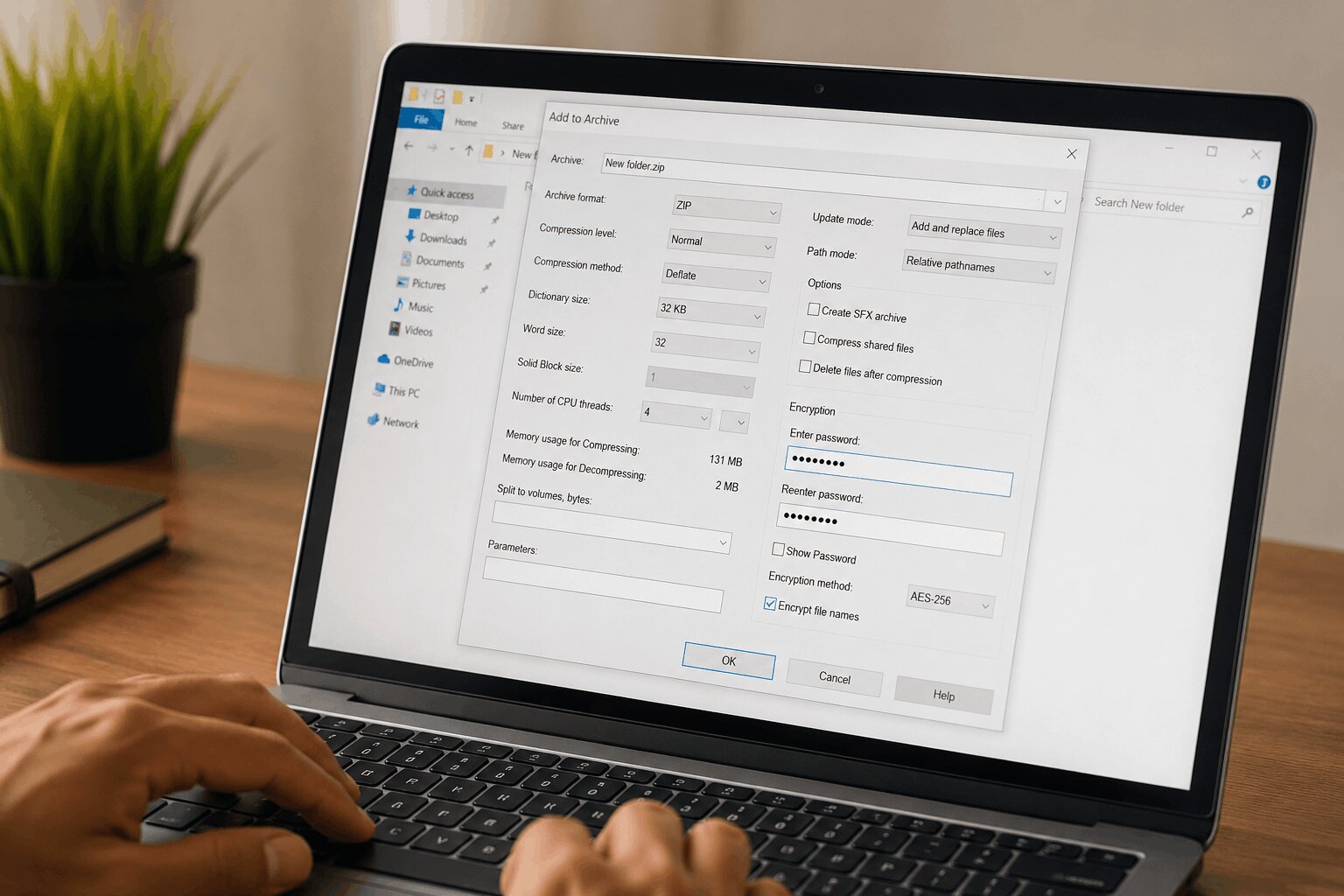
Using 7-Zip
- Install 7-Zip on your computer.
- Right-click the folder you want to protect.
- Select 7-Zip → Add to Archive.
- Choose ZIP as the archive format.
- Enter a strong password in the Encryption section.
- Select AES-256 encryption if available.
- Click OK to create your password-protected ZIP file.
Using WinRAR
- Right-click your folder.
- Select Add to Archive.
- Choose ZIP as the archive format.
- Click Set Password.
- Enter your password.
- Create the archive.
How to Password Protect a ZIP Folder on macOS
Mac users can password protect ZIP files using Terminal or third-party applications. Several free archive utilities also support encrypted ZIP archives with strong AES encryption.
How ZIP Encryption Works
When you protect a ZIP file with a password, the archive is encrypted before it is saved. Modern ZIP utilities commonly use AES-256 encryption, which is considered highly secure when combined with a strong password.
Without the correct password, the contents of the ZIP archive cannot be accessed or extracted.
Tips for Creating a Strong Password
- Use at least 12 characters.
- Combine uppercase and lowercase letters.
- Include numbers.
- Add special symbols.
- Avoid common words or birthdays.
- Use a unique password for important files.
When Should You Password Protect ZIP Files?
Password protection is recommended whenever your ZIP archive contains sensitive or private information.
- Financial documents
- Legal paperwork
- Personal photos
- Office reports
- Business contracts
- Tax documents
- Medical records
- Source code
- Client information
Advantages of Password Protected ZIP Files
- Improves file security.
- Protects sensitive information.
- Easy to share securely.
- Works on most operating systems.
- Supports strong encryption methods.
- Reduces file size while adding protection.
Common Mistakes to Avoid
- Using weak passwords like 123456.
- Sharing the password in the same email as the ZIP file.
- Forgetting the password.
- Using outdated ZIP software.
- Not enabling AES encryption when available.
Can Password Protected ZIP Files Be Cracked?
Strong passwords combined with modern AES-256 encryption are extremely difficult to crack using normal methods. However, weak passwords can be guessed using brute-force or dictionary attacks.
For the best protection, always choose a long, unique password that is difficult to guess.
Final Thoughts
Password protecting a ZIP folder is a simple but effective way to secure your files before sharing or storing them. Whether you're sending confidential documents, backing up important data, or protecting personal information, encrypted ZIP files provide an extra layer of security.
Choose a trusted compression tool, create a strong password, and keep that password safe. With these simple steps, you can protect your files and share them with confidence.
No comments yet. Be the first to share your thoughts!